Using okscale for Design
I recently built okscale, a tool for creating color scales in the OKLCH color space.
Although it's a general-purpose tool, I originally built it because I wanted to use it for the colors of my web projects, like this website!
I want to show the process I use to color a web app with okscale, and why I think it's superior to the alternative methods.
Creating the scales
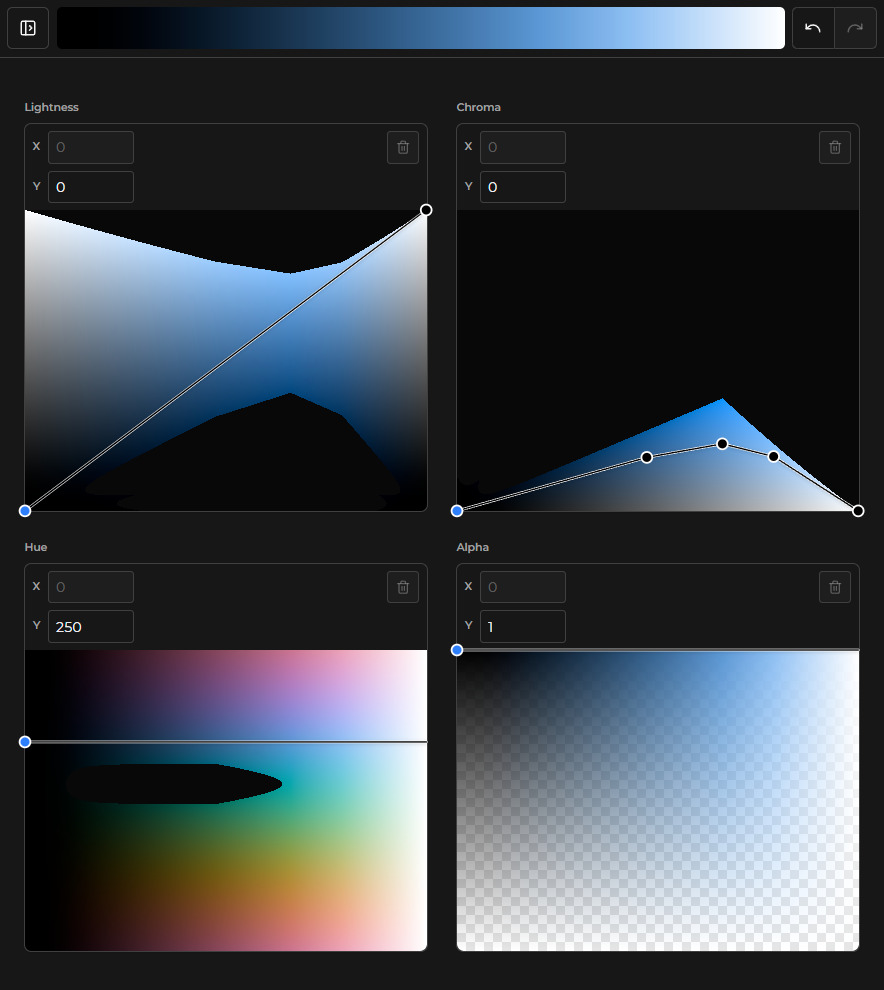
For this website, I created two scales: a blue scale for primary colors (like links and buttons), and a gray (but slightly blue) scale for neutrals.
Here's what they look like in okscale:
Primary Scale:
Neutral Scale:
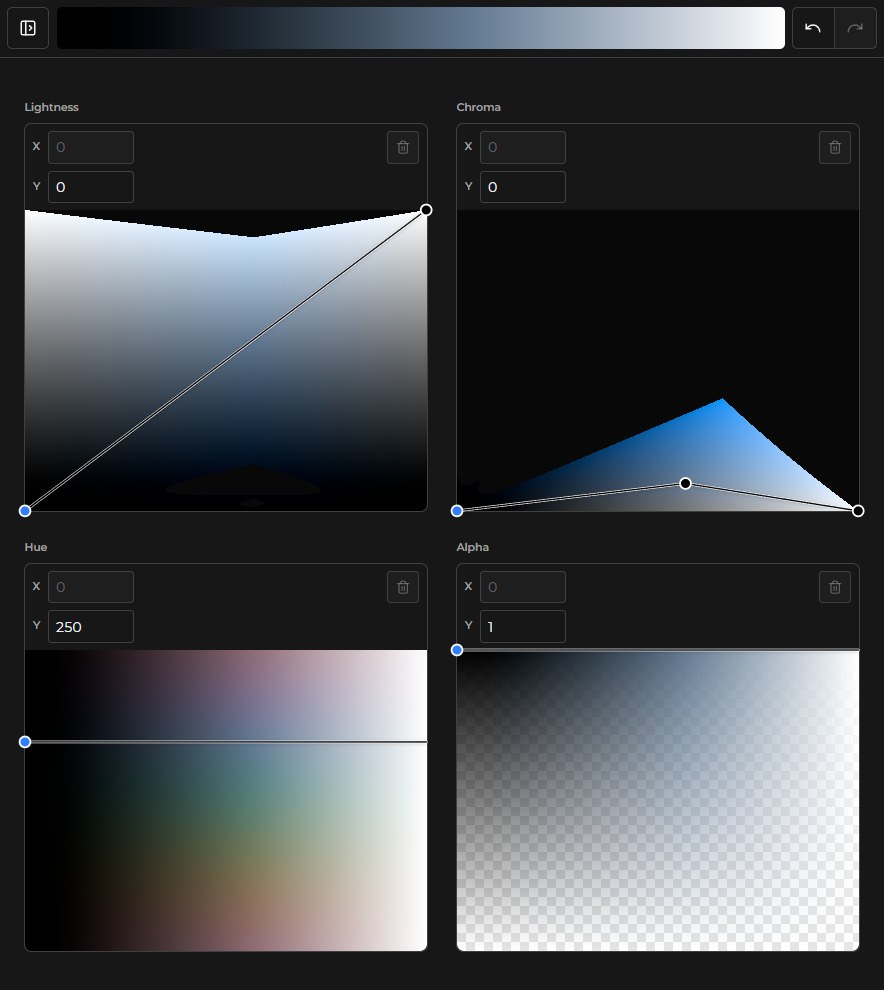
Notice how they linearly progress in lightness from 0 to 1. I found that even though I might not use the far ends of the scales, having the full range means I don't ever need to think about lightness in the scale, and essentially I'm just "sampling over" the lightness value.
I chose to use a constant hue, because from my experience hue-shifting doesn't look very good for UI surfaces. Also, a constant hue in an OKLCH scale feels much more natural than in something like HSL.
For the chroma curve, I made sure that both ends have a value of 0. Because both ends are pure white or black, chroma must be 0 in order to be a valid color. In between 0 and 1, I just moved some points around until I got the look I wanted.
I like using 100 samples because it's dense enough that you would never want/need a color in between two adjacent samples, and it also lets you naturally suffix each sample from 00 to 99 in your generator's output. (see below)
I save the scales JSON in my project at src/scales/elyal-neutral.json and
src/scales/elyal-primary.json.
Generating the CSS
I create a script which takes all of the samples of each scale, as well as a prefix, and makes CSS variables available to the rest of the app.
Since I'm using Tailwind V4, I'm going to wrap the generated variables in the @theme directive, which automatically prunes all unused CSS variables defined inside of it.
This is the TypeScript script I used to generate the CSS:
import * as fs from "fs";
import * as path from "path";
import neutralScale from "../scales/elyal-neutral.json" with { type: "json" };
import primaryScale from "../scales/elyal-primary.json" with { type: "json" };

const outputFilePath = path.resolve(import.meta.dirname, "./scales.css");

let cssText = (
  [
    [neutralScale, "n"],
    [primaryScale, "p"],
  ] as const
)
  .map(([scale, prefix]) =>
    scale.scale.samples
      .map(
        (sample, i) =>
          `--${prefix}${i.toString().padStart(2, "0")}: ${sample.hex};`,
      )
      .join("\n"),
  )
  .join("\n");

cssText = `@theme {
${cssText}
}`;

fs.writeFileSync(outputFilePath, cssText, "utf-8");
And this is the scales.css file that's generated:
@theme {
  --n00: #000000;
  --n01: #000000;
  /* SNIP */
  --n98: #fbfcfc;
  --n99: #ffffff;
  --p00: #000000;
  --p01: #000000;
  /* SNIP */
  --p98: #fafcff;
  --p99: #ffffff;
}
If you aren't using Tailwind, you can replace @theme with :root. You will
get a higher bundle size because there's no pruning of unused variables, but I
really don't think it's a big problem; it'll be at most a few KBs if you're
using a lot of scales.
Using the colors
You can use the generated CSS variables directly in your CSS:
.my-element {
  background-color: var(--n50);
  color: var(--p10);
}
If you're using Tailwind CSS v4, you can use the variables directly in your utility classes using arbitrary values:
<div class="bg-(--n50) text-(--p10)">Hello world</div>I also define semantic design tokens that reference these scale values.
@theme {
  --color-cBgMain: var(--n15);
  --color-cBgWidget: var(--p50);
  --color-cText: var(--n90);
  --color-cTextDim: var(--n75);
  /* ... */
}
Then you can use these tokens in your HTML like this:
<div class="bg-cBgMain text-cText">
  <button class="bg-cBgWidget">Click me</button>
</div>
Why it's better than creating color scales manually
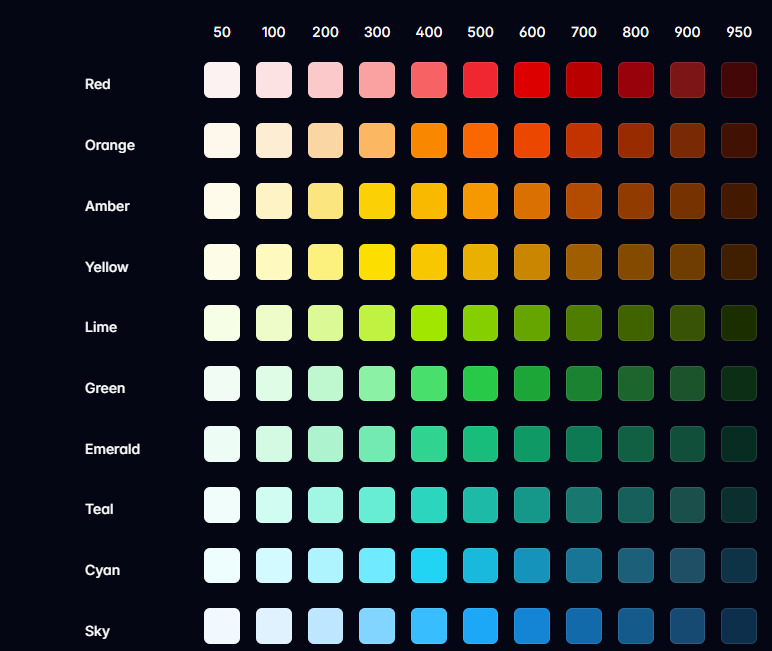
The way Tailwind created their default color palette (which uses a handful of scales with 11 samples each from 50 to 950) is by manually picking each sample in the scale, and eye-balling it to make sure it looks right.
If you wanted to make your own scales by manually picking colors, it would be a pain both to create and especially to modify for a multitude of reasons. For example, if you just want to change the lightness value of a sample in the scale, it will look off. Any time you want to modify a single sample color, you need to eye-ball it to look right again relative to the rest of the scale.